
Google Ads for Service-Based Businesses: How It Works and How to Win Better Projects
Google Ads is great at finding people who are already searching. Finding the customers worth having takes more. How the auction, keywords and bidding really work.

In this article
- What Google Ads is and how search advertising works
- Keywords: search intent versus commercial value
- The real problem: Google Ads doesn't automatically find high-value customers
- Positioning and pre-qualification: how to attract better customers
- Google Ads bidding strategies explained
- If you're starting out or your tracking isn't ready
- If your conversion tracking is accurate and reliable
- If you need to be seen for specific searches
- Your options at a glance: Google Ads bidding strategies
- How to set up Google Ads for a service-based business
- How to measure Google Ads performance properly
- The option most people miss: feeding real sales back into Google Ads
- Customer acquisition cost: what you can afford to pay for a customer
- Sources and further reading
- The bigger lesson: Google Ads finds the searcher, you attract the customer
Google Ads for service-based businesses has one big strength. It puts you in front of people who are already looking for what you do.
A burst pipe. An air conditioner that won't start. A roof that leaks every time it rains.
In each case, the customer picks up their phone and searches Google.
You don't have to convince them they need the service. They've already decided. They're now choosing who to call.
But there's a catch most business owners find out the hard way.
Finding people who want your service is one problem. Finding customers worth having is a different problem.
Someone searching "electrician near me" is showing intent. They might need one light fitted. Or they might be fitting out a new shop.
Google can find the searcher. It can't tell which searchers are good for your business. That comes down to your keywords, ads, landing pages and how you qualify enquiries.
This guide explains how Google Ads works, from the auction to bidding and tracking. It also shows how to measure what really matters: paying jobs and revenue.
What Google Ads is and how search advertising works
Google Ads is Google's advertising platform. Businesses pay to show ads on Google Search, YouTube, Gmail, Google Maps and partner sites.
This guide focuses on Search campaigns. These are the text ads that show at the top and bottom of Google's search results.
With Search, you usually pay when someone clicks your ad. That's why you'll hear it called pay-per-click, or PPC.
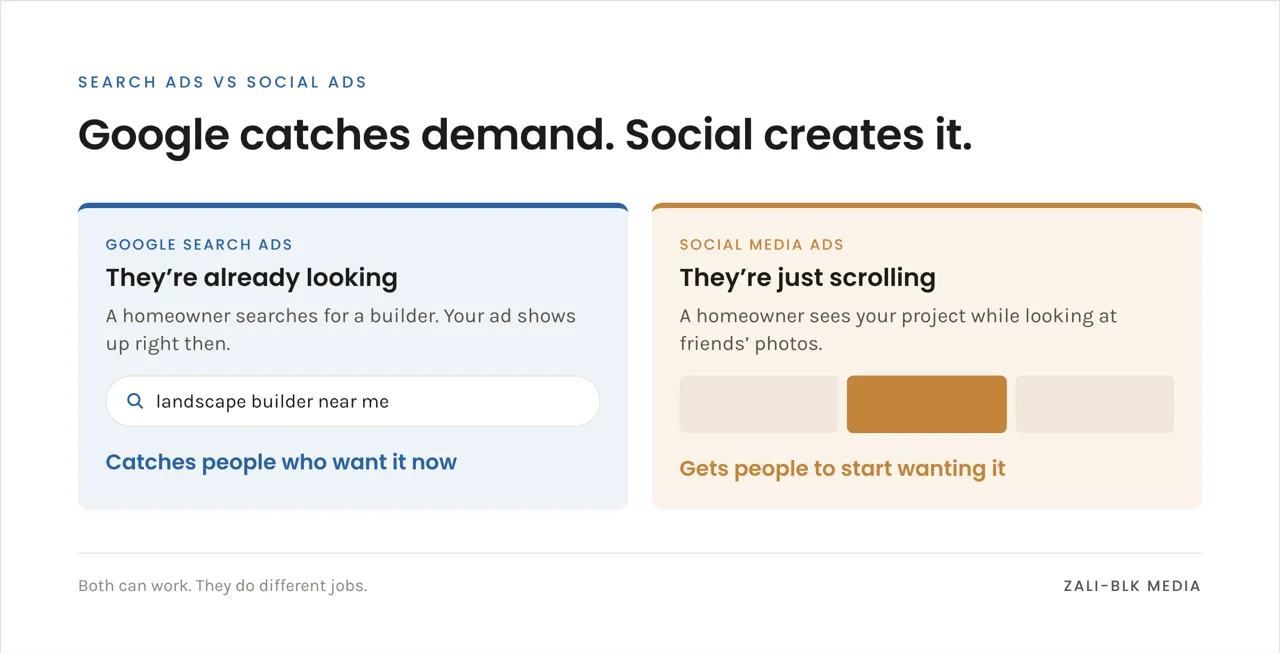
Search ads capture demand. Social ads create it.
On Facebook or Instagram, people aren't looking for a plumber or a roofer. They're scrolling. Your ad interrupts them and tries to spark interest.
That's creating demand. You're reaching people before they've started looking.
On Google, the person has typed "emergency plumber near me" into the search bar. They have a problem now. They want someone to fix it.
That's capturing demand. You're meeting people who are already further along in their buying journey.
Both approaches have a place. But they do different jobs, and they shouldn't be judged the same way.
| Google Search ads | Social media ads | |
|---|---|---|
| What the person is doing | Searching for a service | Scrolling a feed |
| Type of demand | Existing demand | New demand |
| Who you reach | People already looking | People who may need it later |
| How you target | Mostly by what they search | Mostly by who they are and their interests |
| Main limit | Only as many people as are searching | Most people aren't ready yet |
Google Ads is an auction, but not a simple one
Every time someone searches, Google runs an auction for the ads on that page. It happens in a fraction of a second.
Here's how the pieces fit together.
- Keywords are the words and phrases you choose to target, like "commercial cleaning Melbourne".
- Search queries (or search terms) are what people actually type. Your keywords decide which searches your ads can enter.
- Your bid is the most you're willing to pay for a click. You can set this yourself, or let Google set it with automated bidding.
- Ad quality is Google's view of how useful your ad and landing page will be to that searcher.
Google uses these to work out your Ad Rank. Ad Rank decides whether your ad can show at all, and where it sits on the page.
According to Google's own explanation of Ad Rank, it's based on:
- Your bid.
- The quality of your ad and landing page.
- Ad Rank thresholds, the minimum score needed to show in a position.
- How competitive the auction is.
- The context of the search, such as location, device and time of day.
- The expected impact of assets, like phone numbers and sitelinks.
What "ad quality" means
Google gives each keyword a Quality Score from 1 to 10. It's built from three parts.
- Expected click-through rate. How likely people are to click your ad for that search.
- Ad relevance. How closely your ad matches what the person searched for.
- Landing page experience. How useful and relevant your page is once they click.
Google says Quality Score is a diagnostic tool. It is not an input in the auction itself. But the three parts behind it reflect what the auction does care about: relevance and usefulness.
Why the highest bid doesn't always win
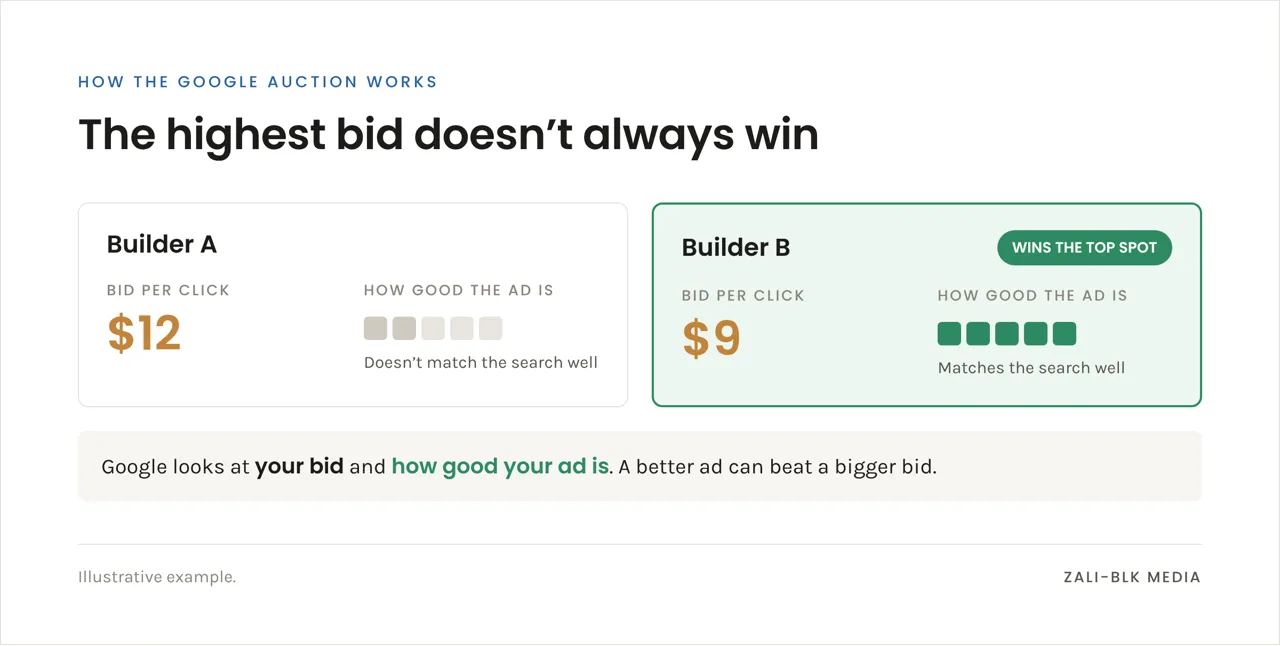
Picture two builders bidding on "granny flat builder Newcastle".
One bids $12 a click. Their ad is generic. It sends people to a homepage that barely mentions granny flats.
The other bids $9 a click. Their ad mentions granny flats in Newcastle. It sends people to a page about exactly that.
The second builder can still outrank the first. Google wants to show the ad most likely to help the searcher. Bid matters, but it's only one part of Ad Rank.
Google also notes that better quality can lower what you actually pay per click. You usually pay less than your maximum bid.
Keywords: search intent versus commercial value
This is the part most campaigns get wrong.
Not every search means the same thing.
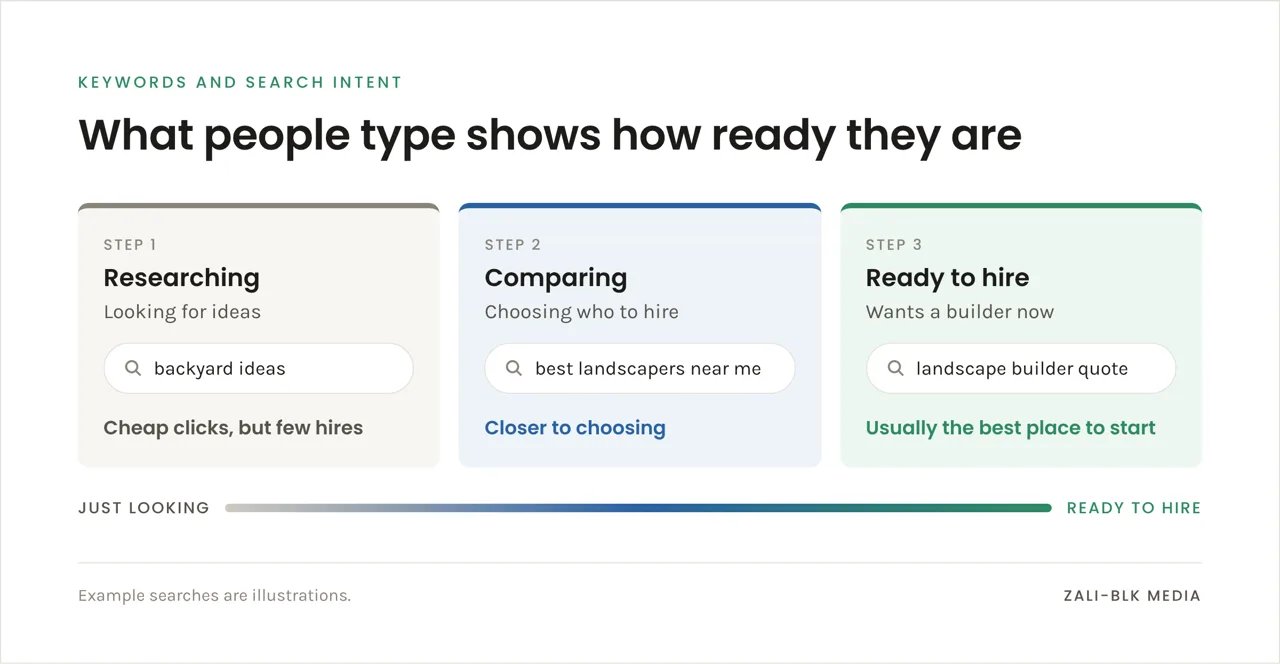
Some people want to learn. Some are comparing options. Some are ready to book.
Informational searches: people researching
These people want answers. They aren't ready to hire anyone yet.
- How much does a roof replacement cost?
- Why is my hot water system leaking?
- Ducted or split system air conditioning?
These clicks can be cheap. But most of the people behind them won't book today.
Commercial investigation searches: people comparing
These people are comparing providers. They're getting closer to a decision.
- Best pest control company Perth
- Commercial cleaning companies reviews
- Roof replacement quotes
Transactional, high-intent searches: people ready to hire
These people want to hire someone now.
- Emergency plumber Parramatta
- Electrician near me
- Air conditioning installation Brisbane
- Car service Geelong
- Concreter Adelaide
High-intent keywords are usually the best starting point for lead generation. But here's the important part.
Search intent tells you someone wants to hire. It doesn't tell you what the job is worth.
Someone searching "electrician near me" might want one power point fixed.
Someone searching "commercial electrical contractor" might be pricing a full shop fit-out.
Both show strong intent. The value of the work is completely different.
| Search | Intent | Likely job value | What it tells you |
|---|---|---|---|
| cheap plumber near me | High | Small | Price is the main concern |
| blocked drain plumber | High | Small, urgent | Fast response wins the job |
| electrician near me | High | Anything | Could be a light or a rewire |
| office cleaning contract Sydney | High | Ongoing | Repeat revenue, slower decision |
| roof replacement quote | High | Large | Several quotes before choosing |
| custom home builder Melbourne | High | Very large | Months of planning first |
These are illustrations, not rules. Real search terms always need checking against real enquiries.
Here's how the three levels of intent look for one trade:
How to choose the right keywords for the work you want
Start with the work you actually want. Then choose keywords that match it.
What that looks like depends on the business.
- A plumber who wants emergency work might focus on "emergency", "burst pipe" and "24 hour" searches.
- An electrician chasing commercial work might target "commercial electrician" and "fit-out" terms. They might exclude "light installation" searches.
- A cleaning company that wants contracts might target "office cleaning" and "commercial cleaning". They might exclude "bond clean" and "end of lease".
- A builder who wants full renovations might lean into "renovation builder" and "design and build". They might keep "handyman" searches out.
For most service businesses, it's also worth blocking "cheap", "free", "DIY" and "jobs" searches.
Keyword choice is the first filter. It isn't the only one.
The real problem: Google Ads doesn't automatically find high-value customers
Google Ads responds to search demand. It can't create searches that don't exist.
Say thousands of people search for a cheap end-of-lease clean. Only a few search for a long-term office cleaning contract. Google can't turn one group into the other.
It helps to separate four ideas that often get mixed up:
- High search volume. Lots of people are searching.
- High purchase intent. The searcher wants to buy.
- High commercial value. The job would be worth a lot.
- High-value customer. The job is a good fit, has the budget and is profitable for you.
A keyword can have all of the first three and still bring you the wrong customer.
Different service industries search and buy differently
Not every service business works the same way on Google. The way people search depends on what they're buying.
- Urgent jobs, like emergency plumbing, electrical faults or a locksmith. People search, call and book within minutes. Speed and phone answering decide who wins.
- Planned, mid-size jobs, like an air conditioning install, pest control or a car service. People compare a few options over days. Reviews and clear pricing matter.
- Large projects, like roofing, building, pools or landscaping. People research for weeks or months. They often get several quotes before signing.
- Ongoing contracts, like commercial cleaning or maintenance. A business makes the decision, often with more than one person involved. One contract can bring years of revenue.
Each type needs different keywords, ads, landing pages and expectations. Judge a roofing campaign by emergency plumbing standards and it will look like it's failing.
Why it gets harder as you move upmarket
The bigger the jobs you want, the smaller the pool of people searching for them.
That's true for a builder chasing custom homes. It's also true for an electrician chasing large commercial fit-outs.
As you move upmarket, you'll often see:
- Fewer relevant searches.
- More competition for specialist terms.
- Higher cost per click.
- Longer decisions, often months.
- Fewer qualified enquiries.
- A more involved sales process.
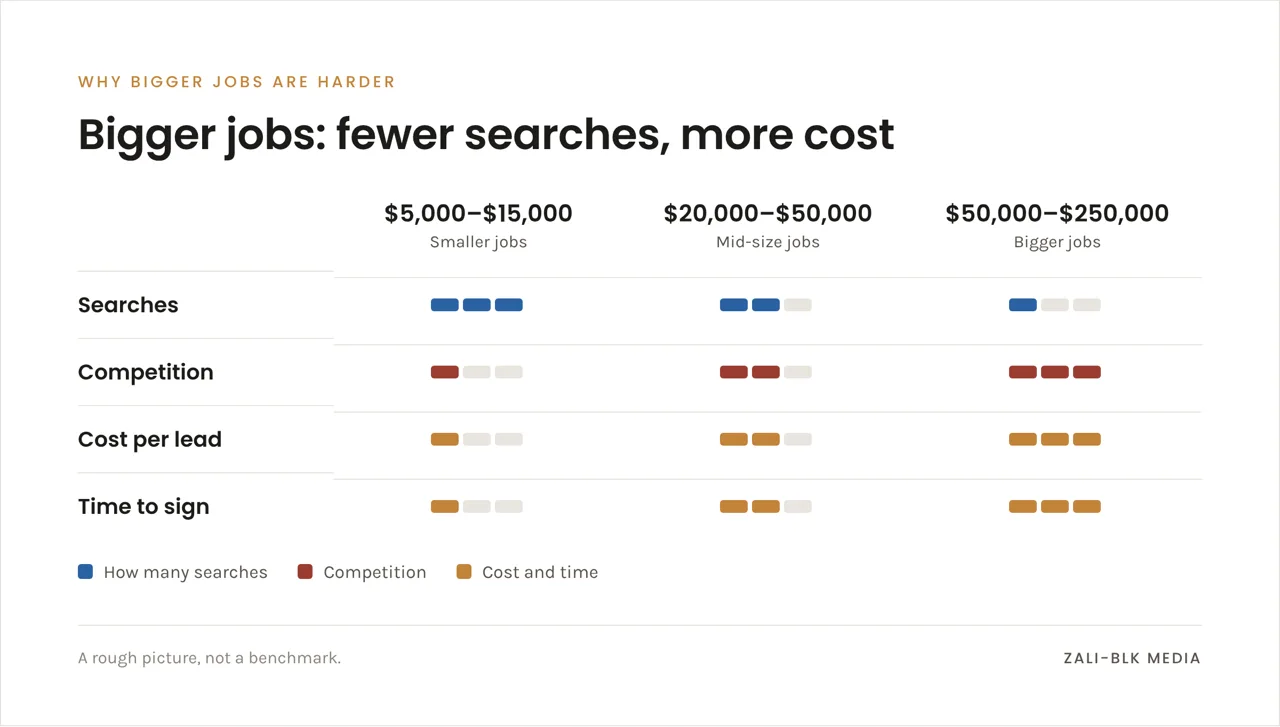
Here's a rough picture of how this often plays out for project-based businesses. These are illustrations, not benchmarks.
| Job size | Search demand | Competition and lead cost | What changes |
|---|---|---|---|
| $5,000–$15,000 | Plenty | Lower | Lots of enquiries, smaller jobs |
| $20,000–$50,000 | Moderate | Higher | More competition, more qualifying |
| $50,000–$250,000 | Limited | Highest | Fewer searches, longer sales cycles |
We cover this in more depth in why Google Ads gets harder when you move upmarket.
Check the demand before you commit
Before you rely on Google Ads for your biggest jobs, check the search demand in your area.
Google's Keyword Planner gives a rough guide. Your own search-term reports, once a campaign is running, give a far better one.
In some markets, Google Ads can bring a steady flow of large jobs. In others, there simply aren't enough of those searches. Then Google Ads might be one channel among several, not the whole plan.
Positioning and pre-qualification: how to attract better customers
Keywords decide who can see your ad. They don't decide who enquires.
To attract the right customers, the whole experience needs to point the same way. That means the ad, the landing page and the enquiry form.
Marketing positioning: how you present the business
Positioning is how the business presents itself. Customers judge you quickly, often in seconds.
What shapes that judgement:
- How your website presents the business.
- The quality and type of work you show.
- Photos of real jobs, not stock images.
- Reviews, testimonials and credibility.
- The services you promote first.
- The words you use in your ads.
- The job sizes and expectations you set.
A facilities manager hiring a commercial cleaner wants to see offices you already clean. A homeowner planning a $60,000 renovation wants to see finished renovations. If your site shows mostly small repairs, they'll assume you're not the right fit.
Ad messaging that filters enquiries
Your ad is the first filter a searcher sees. It can attract the right people and quietly put off the wrong ones.
A business that wants larger jobs shouldn't call itself the cheapest in town. That message attracts price shoppers.
Compare these two headlines for a roofing company:
- "Cheap Roof Repairs | Free Quotes | Call Now"
- "Full Roof Replacements | Tile to Metal | Sydney"
The second one speaks to someone replacing a whole roof. It also tells a small-repair searcher this probably isn't for them.
Urgent services work differently. An emergency plumber's ad should lead with response time, service area and a phone number. The goal is a call within minutes.
Dedicated landing pages for each service
Sending every click to your homepage wastes money. A dedicated landing page is built for one service and one type of customer.
A good landing page helps you:
- Match what the person searched for.
- Back up your positioning.
- Show relevant past work.
- Build trust with reviews and proof.
- Explain how the service works.
- Make it easy for the right people to enquire.
It also improves landing page experience, which feeds into Ad Rank.
Landing pages and conversion rates
Your conversion rate is the share of visitors who enquire. If 100 people click and 6 enquire, that's 6%.
A higher conversion rate lowers your cost per enquiry without raising your bids. Small changes to the page can make a real difference.
- A headline that matches the search.
- A phone number that's easy to tap on a mobile.
- A short form that asks only what you need.
- Reviews and photos of real work near the form.
- A page that loads quickly.
Many urgent customers would rather call than fill in a form. Make calling the easiest option on those pages.
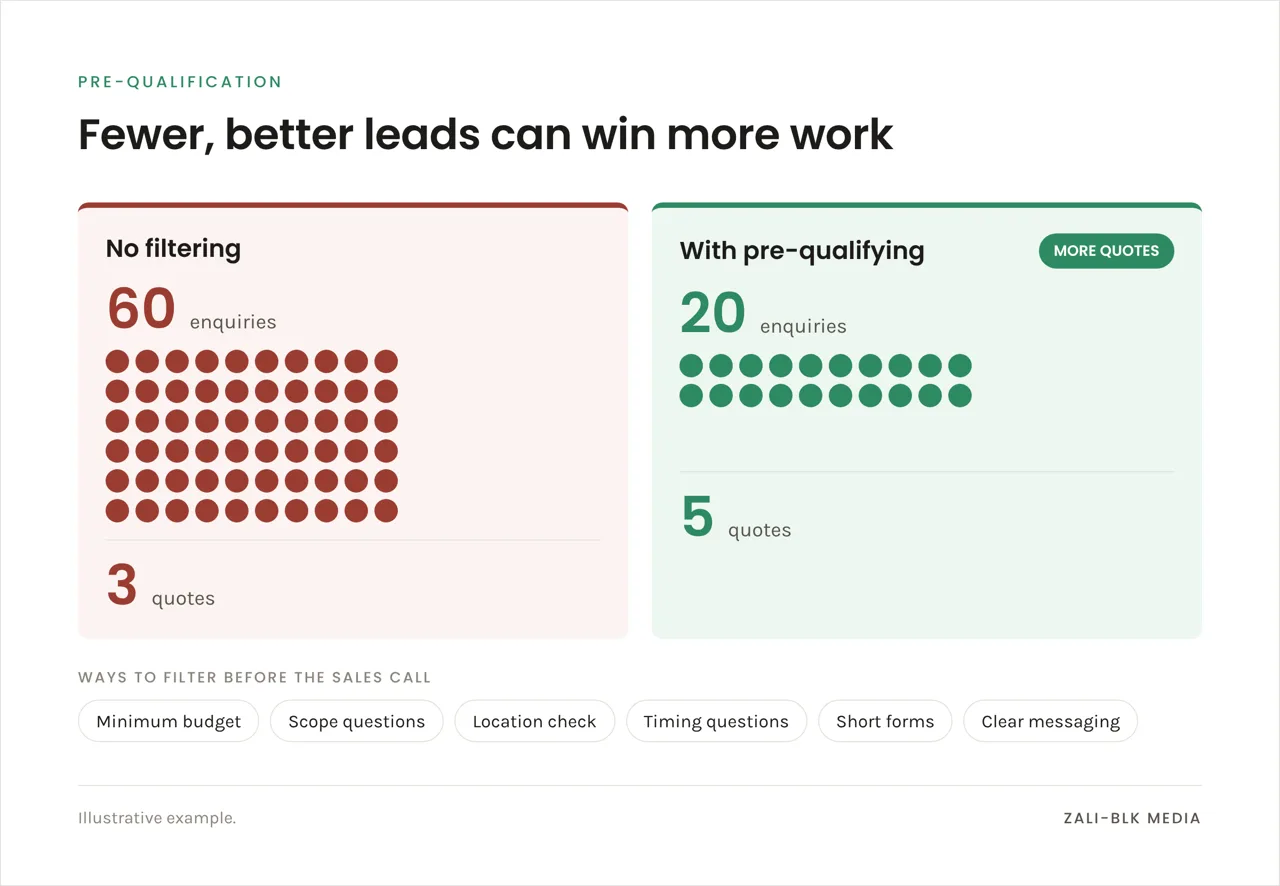
Pre-qualification before the sales call
Pre-qualification means sorting enquiries before they reach a quote, site visit or sales call. Done well, it saves hours of wasted time.
Ways to do it:
- Minimum job sizes. "Most of our renovations start from $40,000."
- Service questions. What exactly do they need done?
- Location questions. Are they in your service area?
- Timeline questions. Are they starting soon, or in a year?
- Qualification forms. A few short questions before they submit.
- Clear messaging. Say plainly what kind of work you take on.
Every question you add may lower the number of enquiries. That isn't always bad.
Fewer leads can be a good result if more of them turn into real jobs.
Twenty enquiries that lead to five quotes can beat sixty that lead to three.
This works best for planned jobs and larger projects. For urgent, low-cost work, extra questions can lose the booking. There, your keywords, ads and phone handling do the filtering.
Google Ads bidding strategies explained
Your bidding strategy tells Google what you want from each auction.
More clicks? More enquiries? More value?
Google's current list of bid strategies groups them by goal. These are the ones that matter for a service business running Search campaigns.
A quick note before we start. Google's help pages list Target CPA and Target ROAS as their own strategies.
In your account, you may also see them as an optional target inside Maximise Conversions or Maximise Conversion Value. Google says the bidding works the same either way.
You may also read about Enhanced CPC in older guides. Google retired it for Search campaigns in 2025, and those campaigns now run on Manual CPC. Google changes these options from time to time, so check what your account shows.
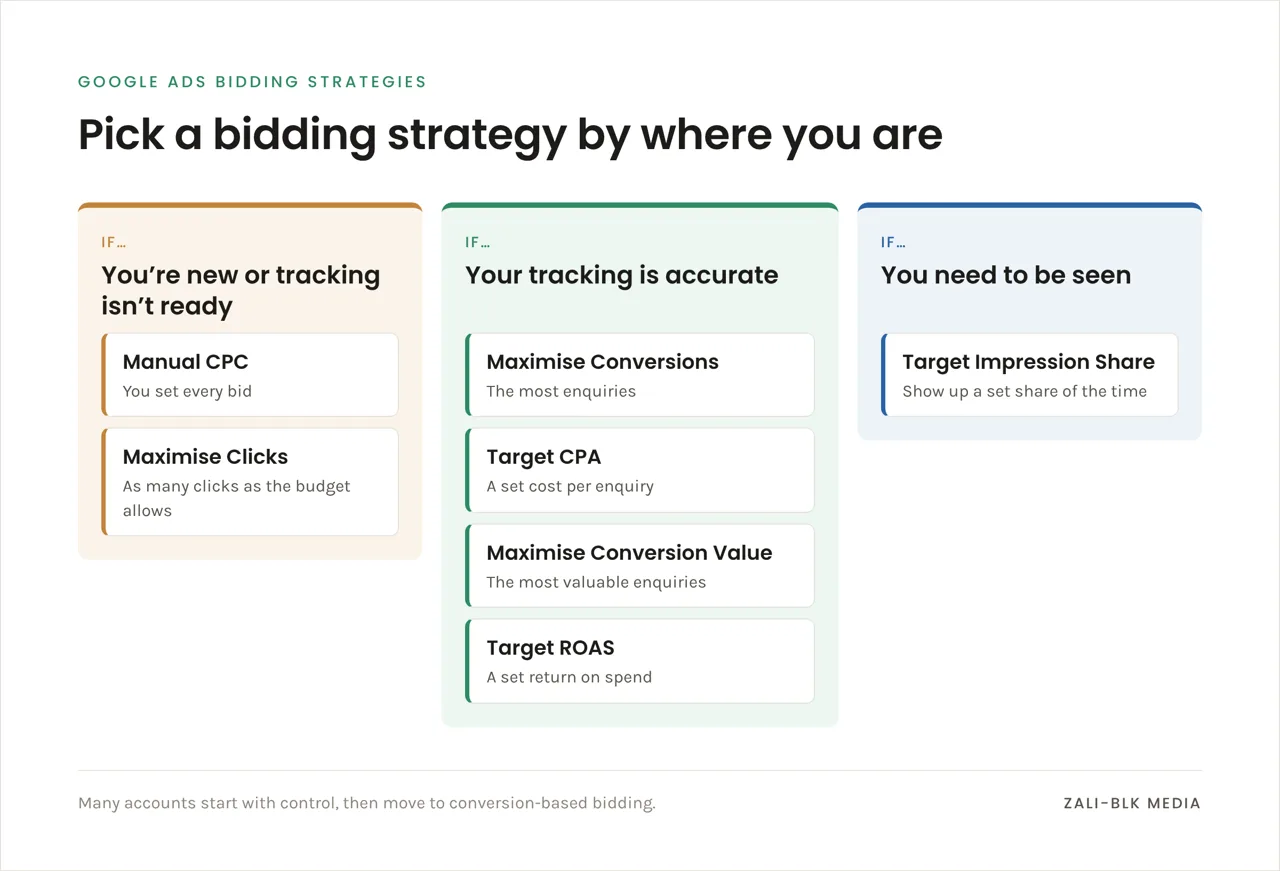
Which strategy fits depends mostly on one thing: how good your conversion data is.
If you're starting out or your tracking isn't ready
New campaigns have no history. Google has nothing to learn from yet, so control and clean data come first.
1. Manual CPC: you set every bid
What it does: You set the maximum amount you'll pay for a click on each keyword or ad group.
How it works: Google won't go above your bid. You raise or lower bids yourself, based on what you see.
When to use it: New accounts with little data. Very small budgets. Times when you need tight control over specific keywords.
Example: An electrician sets a $6 maximum on "emergency electrician Brisbane". They set $2 on broader terms while they learn what converts.
2. Maximise Clicks: as much traffic as the budget allows
What it does: Google tries to get as many clicks as possible within your daily budget.
How it works: Google sets your bids automatically. You can add a maximum CPC bid limit so no single click costs too much.
When to use it: Brand new campaigns that need early traffic. Campaigns where conversion tracking isn't set up yet.
Example: A new pest control campaign runs on Maximise Clicks for a few weeks with a $5 cap. The aim is to collect search-term data and the first few conversions.
If your conversion tracking is accurate and reliable
Once Google can see which clicks become enquiries, automated bidding has something to work with. These strategies all depend on that data.
1. Maximise Conversions: the most enquiries for your budget
What it does: Google tries to get the most conversions it can within your budget.
How it works: Google uses your conversion tracking to learn which searches tend to lead to enquiries. It then adjusts bids at auction time.
When to use it: Once conversion tracking is accurate and the campaign is getting a steady flow of conversions.
Example: A plumbing business tracks quote form submissions and phone calls over 60 seconds. Google bids more for searches that look likely to produce those.
Accurate tracking is essential, and ideally it should reflect lead quality, not just volume.
2. Target CPA: an average cost per enquiry
What it does: You tell Google the average cost per conversion you'd like. CPA means cost per acquisition.
How it works: Google tries to get as many conversions as it can at or around that average. Some will cost more and some less.
When to use it: When you have enough conversion history to know what a realistic cost is.
Example: A roofing company's last three months averaged $180 per enquiry. They set a target of $190 and lower it slowly.
3. Maximise Conversion Value: the most valuable enquiries
What it does: Instead of chasing the most conversions, Google chases the most total value.
How it works: You give each conversion a value. Google then bids harder for searches likely to produce the valuable ones.
When to use it: When some conversions matter far more than others. For example, a commercial enquiry worth more than a small one-off job.
Example: A cleaning company gives a one-off home clean enquiry a value of 50. A commercial contract enquiry gets 500. A signed contract imported from their CRM gets its real value.
4. Target ROAS: a set return on ad spend
What it does: You tell Google the return you want on your ad spend. ROAS means return on ad spend.
How it works: A Target ROAS of 500% asks for $5 in conversion value for every $1 spent. Google bids to hit that average.
When to use it: When you can track real values reliably, and ideally feed signed sales back into Google Ads.
Example: A building company imports signed contracts from its CRM. It sets a ROAS target based on months of that data.
Google needs value data that arrives in time to be useful. Without it, Target ROAS often limits spend or chases the wrong signals.
If you need to be seen for specific searches
Sometimes visibility matters more than volume. Your own business name is the clearest case.
1. Target Impression Share: show up a set share of the time
What it does: Google bids to show your ad a set share of the time. You choose where: anywhere on the page, the top of the page or the very top spot.
How it works: You might ask Google to show your ad at the top for 80% of eligible searches. You can set a maximum CPC limit to cap costs.
When to use it: Brand searches, where you want to appear whenever someone searches your business name. Or a small number of very important terms.
Example: A mechanic wants to show first whenever someone searches the workshop's name. That stops a competitor taking the click.
Your options at a glance: Google Ads bidding strategies
| Strategy | Best for | Needs | Main risk |
|---|---|---|---|
| Manual CPC | Control, new or small accounts | Time and attention | Slow to react to each search |
| Maximise Clicks | Early traffic and data | A CPC limit | Cheap, low-quality clicks |
| Maximise Conversions | Growing enquiry volume | Accurate conversion tracking | Optimising for junk leads |
| Target CPA | Steady cost per enquiry | Conversion history | Targets set too low stop delivery |
| Maximise Conversion Value | Prioritising better leads | Sensible conversion values | Guessed values mislead Google |
| Target ROAS | Return on spend | Reliable sales values | Long sales cycles delay the data |
| Target Impression Share | Brand and key terms | A CPC limit | Paying for visibility, not results |
There's no single best strategy. In our experience, many service accounts start with tighter control, then move to conversion-based bidding once tracking is reliable.
How to set up Google Ads for a service-based business
There's no one structure that suits every account. An electrician with one service area and a small budget needs something different from a builder working across three regions.
That said, the process below works for most service businesses.
- Understand the work the business wants. Which services, job sizes and areas are most profitable?
- Research keywords and search demand. How many people search for that work in that area?
- Group keywords by service and intent. Blocked drains and bathroom renovations shouldn't share an ad group.
- Build focused campaigns and ad groups. Each one matches a service and a type of search.
- Write ads that carry the positioning. The ad should sound like the business, not a discount offer.
- Create dedicated landing pages. One page per main service, matched to the ads.
- Set up conversion tracking. Forms, calls and, where possible, what happens after the enquiry.
- Review search-term reports. See what people actually typed before they clicked.
- Add negative keywords. Block searches that waste budget.
- Monitor impression share. Where relevant, check how often you're missing out because of budget or Ad Rank.
- Test ads and landing pages. Change one thing at a time and compare.
- Measure what matters. Qualified enquiries, quotes, booked jobs and revenue.
Campaign structure: campaigns, ad groups and keywords
A campaign holds your budget, locations and bidding strategy. An ad group sits inside a campaign and holds related keywords and ads.
A simple rule helps. Split campaigns when the budget, locations or bidding need to differ. Split ad groups when the search, the ad and the landing page differ.
For example, a plumber might run emergency work and bathroom renovations as separate campaigns. The emergency campaign focuses on calls and runs whenever someone can answer the phone. The renovation campaign sends people to a quote form.
Targeting: location, schedule and device
Search campaigns are targeted mostly by keywords. But you also choose where and when your ads show.
- Location. Target the areas you actually service. Google's recommended setting, "Presence or interest", can also reach people elsewhere who show interest in your area. If that brings enquiries from outside your area, "Presence" limits ads to people in your locations.
- Ad schedule. Run ads when you can respond. An urgent service that can't answer at 2am shouldn't pay for 2am clicks.
- Devices. Check results by device. Calls and forms can perform very differently on mobile and desktop.
Negative keywords keep the wrong searches out
A negative keyword stops your ad showing for searches that contain it.
Here are common examples for service businesses:
| Negative keyword | Why you'd exclude it |
|---|---|
| cheap, cheapest, free | Signals price shopping |
| DIY, how to | People doing it themselves |
| jobs, careers, apprenticeship, salary | Job seekers, not customers |
| course, TAFE, licence | Students |
| Bunnings, parts, supplies | Shoppers buying products |
| Services you don't offer, like "bond clean" for a commercial cleaner | The wrong type of work |
| Suburbs or towns you don't service | Outside your service area |
Search-term reviews: check what people really typed
Your keywords and the actual searches are not the same thing. The search terms report shows the real searches that triggered your ads.
Read it every week in a new campaign. Add negatives for anything wasted. Add strong new searches as keywords.
Google leaves very low-volume searches out of this report. So you won't see every search, but you'll see enough to act on.
Search terms change all the time. Every wasted click is money that could have gone to a real enquiry.
How to measure Google Ads performance properly
Cost per lead is the number everyone watches. On its own, it doesn't tell you much.
What actually matters is the full path from ad spend to profit:
Ad spend → clicks → enquiries → qualified enquiries → quotes → paid jobs → revenue → gross profit
The middle steps vary by industry. A mechanic might go straight from a phone call to a booking. A builder might have site meetings, plans and several rounds of quotes.
A campaign can have a great cost per lead and still lose money. Another can have an expensive cost per lead and be your best source of work.
Conversion tracking: count the right actions
A conversion is an action you count as a result, like a form or a phone call. Without conversion tracking, Google can't tell which clicks worked.
Most service businesses should track:
- Quote and booking form submissions.
- Calls from the ads themselves.
- Calls from the website that last a set time.
- Online bookings, if you take them.
Make sure each enquiry only counts once and spam doesn't count at all. Bad tracking leads to bad bidding.
Lead quality matters more than lead volume
Not every lead is worth the same. Ten calls about work you don't do aren't ten leads.
Give each enquiry a simple label, like good fit, poor fit or spam. After a month, compare campaigns on good-fit leads, not total leads.
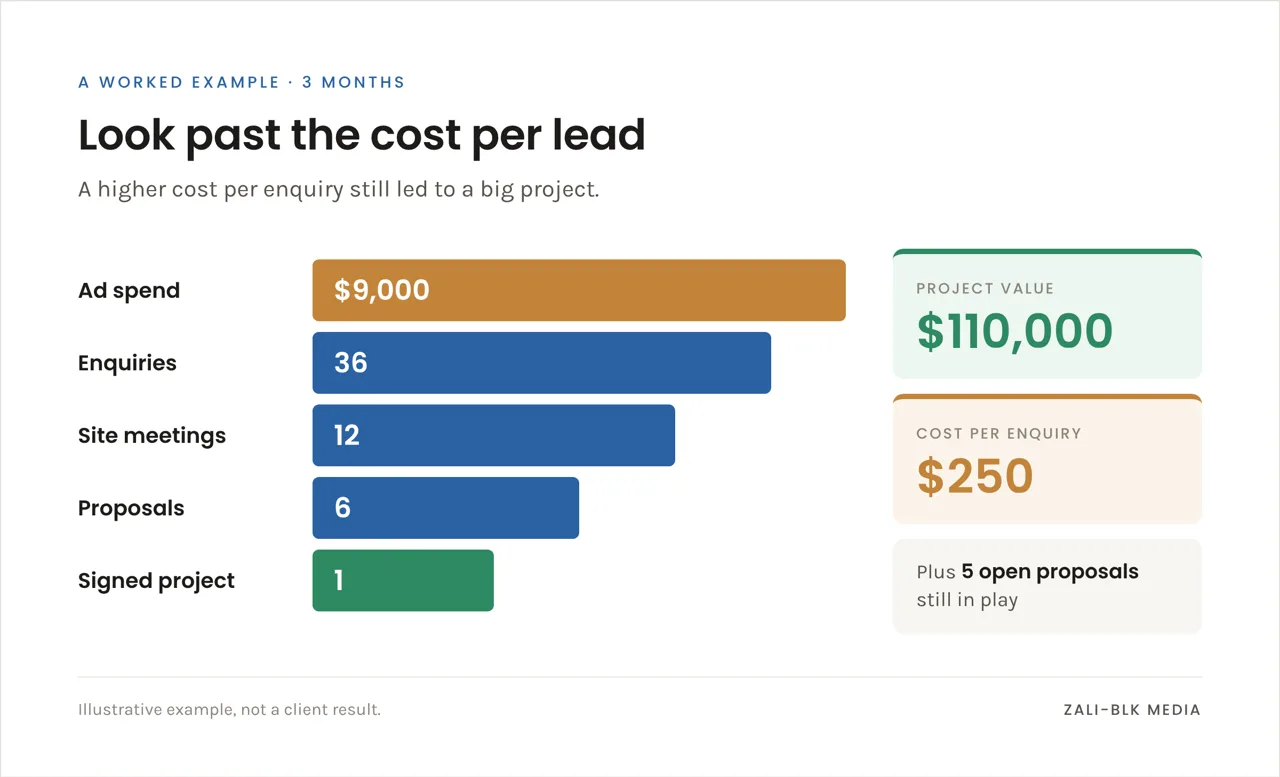
A worked example
This is an illustration, not a client result.
A building company spends $9,000 on Google Ads over three months.
| Stage | Result |
|---|---|
| Ad spend | $9,000 |
| Enquiries | 36 |
| Cost per enquiry | $250 |
| Site meetings | 12 |
| Proposals | 6 |
| Signed projects | 1 |
| Project value | $110,000 |
If you only looked at the $250 cost per lead, you might think it was expensive. You might even switch the campaign off.
But that $9,000 helped bring in a $110,000 project. Five more proposals are still open.
One good project doesn't prove everything
The flip side matters too.
One signed project could be luck. It doesn't prove the campaign is profitable or that it will repeat.
Before calling it a success, you'd want to know:
- What gross profit the project actually earned.
- How many of the open proposals turn into work.
- Whether the results hold over six or twelve months.
- Whether more budget would bring more of the same, or just more cost.
We've written more on why Google Ads should be judged over months, not weeks.
The option most people miss: feeding real sales back into Google Ads
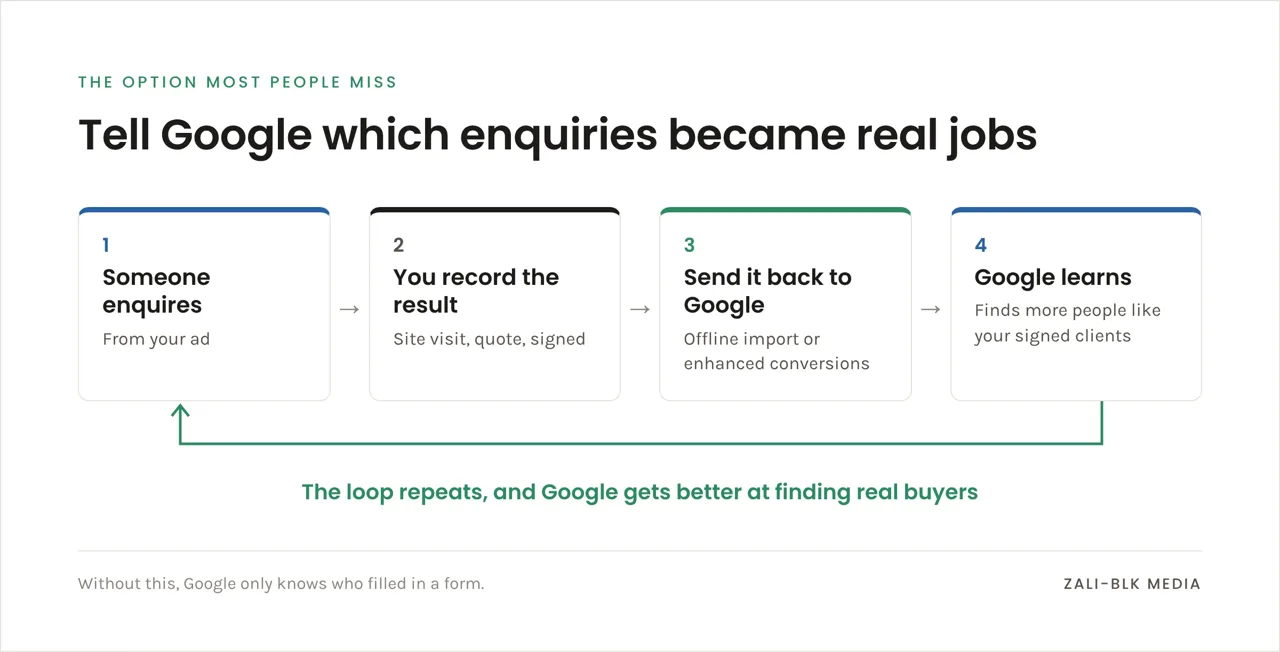
By default, Google only knows that someone filled in a form. It doesn't know whether they became a $110,000 job or a time-waster.
Most accounts stop there. That means Google keeps optimising for form fills, good and bad alike.
You can change that.
- Offline conversion imports let you send sales outcomes back into Google Ads. For example, "qualified lead" or "job won".
- Enhanced conversions for leads matches hashed customer details, like an email address, from your lead form. Google describes it as an upgraded version of offline conversion import.
Once these are set up, Google can learn which searches lead to real work, not just form fills. This is where Maximise Conversion Value starts to make real sense.
How to do it: connect your enquiries to real outcomes
- Turn on auto-tagging in Google Ads, so each click carries an ID.
- Collect an email or phone number on every enquiry form.
- Set up enhanced conversions for leads through the Google tag or Google Tag Manager.
- Mark each enquiry's outcome in your CRM. For example: qualified, quoted, booked, paid.
- Send those outcomes back to Google Ads. Google's Data Manager, or a CRM connection, can do this.
- Give each outcome a value. A paid job is worth far more than a raw enquiry.
Customer acquisition cost: what you can afford to pay for a customer
Customer acquisition cost is what it costs you to win one paying customer. The examples below count ad spend only. If you can, add your sales time too.
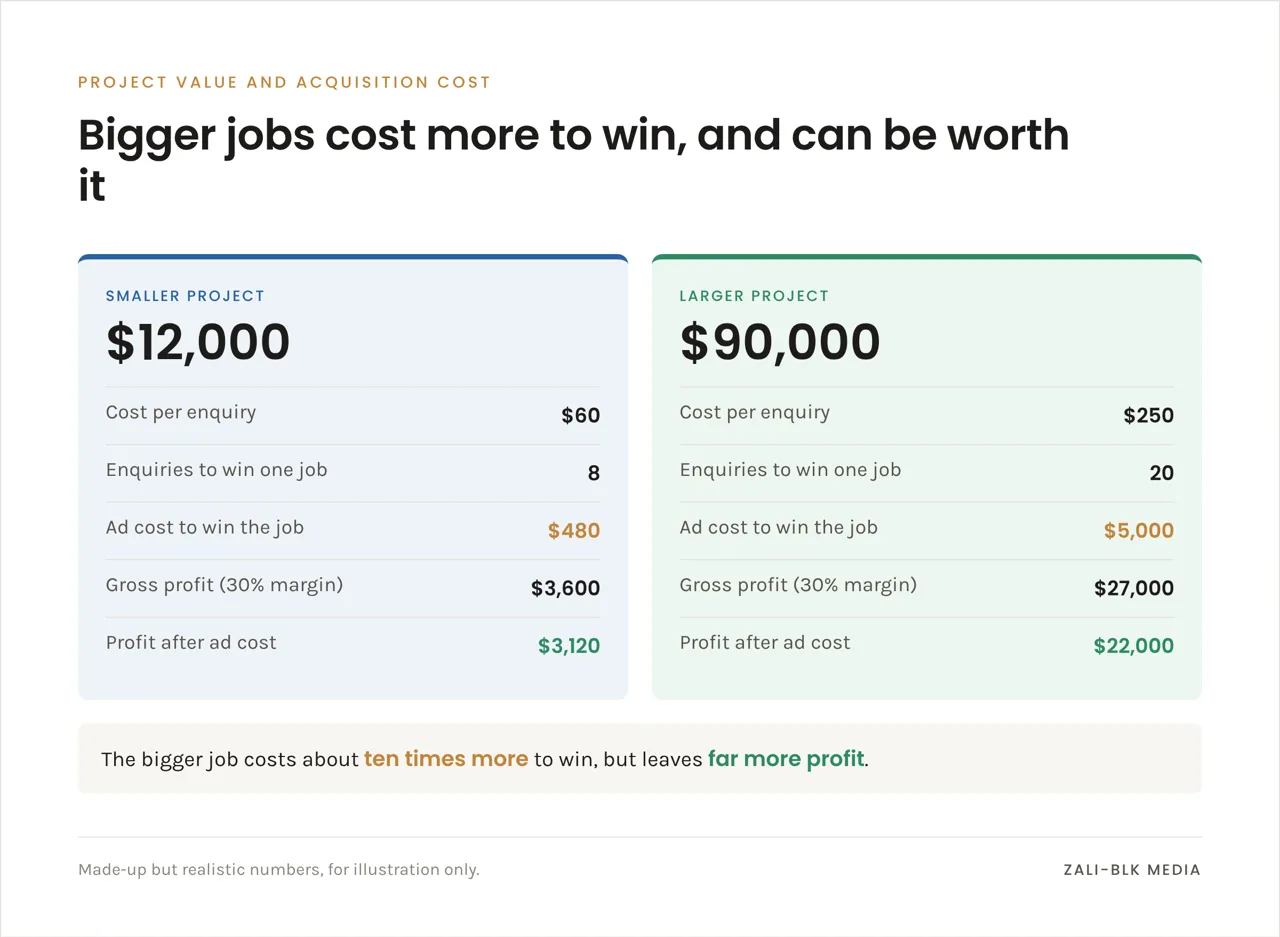
Higher-value jobs usually cost more to win. That's normal. The question is whether the numbers still work.
Here's an illustration with made-up but realistic numbers.
| Smaller jobs | Larger jobs | |
|---|---|---|
| Average job value | $12,000 | $90,000 |
| Cost per enquiry | $60 | $250 |
| Enquiries needed to win one job | 8 | 20 |
| Ad cost to win one job | $480 | $5,000 |
| Gross margin | 30% | 30% |
| Gross profit per job | $3,600 | $27,000 |
| Gross profit after ad cost | $3,120 | $22,000 |
The larger job costs ten times as much to win. It still returns far more profit per job.
But look at what's hidden in the table:
- Larger jobs often need more site visits, quoting time and follow-up.
- The sales cycle can be months longer.
- One lost quote hurts more when there are fewer of them.
- Your margins and win rate may be very different from these numbers.
Expensive leads don't automatically mean better customers. A $250 lead from a poorly targeted campaign is just an expensive bad lead.
Some service businesses also earn repeat work. A pest control, cleaning or servicing customer might pay you every few months for years. There, compare acquisition cost with what a customer is worth over time, not just the first job.
Work out what you can afford
Before deciding what a lead is worth, you need a few numbers:
- Your average job value for the work you want.
- Your gross margin on that work.
- Your enquiry-to-paid-job rate.
- How long your sales cycle usually takes.
From those, you can work out the most you can spend to win a customer and still make money. That's your real limit, not a cost-per-lead number someone told you was "good".
Then check five numbers every month: ad spend, good-fit leads, jobs won, revenue and gross profit from Google Ads. Together, they show whether your advertising is actually paying for itself.
The goal isn't the cheapest leads. It's the most profitable customers.
Sources and further reading
These Google Ads Help pages back up the platform details in this guide. The views on strategy, job values and lead quality come from our own campaign experience.
- About Ad Rank
- About Quality Score for Search campaigns
- Choose your bid strategy
- About Enhanced CPC (ECPC)
- About Maximize clicks bidding
- About Maximize conversions bidding
- Location targeting
- About negative keywords
- About the search terms report
- About offline conversion imports
- About enhanced conversions for leads
The bigger lesson: Google Ads finds the searcher, you attract the customer
Google Ads is very good at one thing. It puts you in front of people who are already searching for your service.
What it can't do is decide which of those people are right for your business. That's your job, and it's what separates average campaigns from profitable ones.
The right keywords get you into the right searches. The right ads and landing pages attract the right people.
Pre-qualification filters out the rest. Proper tracking tells Google, and you, what's really working.
Three things you can do this week:
- Check your search terms. Open your search terms report and add negative keywords for anything you'd never want to quote.
- Read your ads as a customer would. Do they sound like the business that does the work you want?
- Track one step past the form. Start recording which enquiries become quotes, bookings and paid jobs.
Google Ads can capture existing demand. Winning better customers takes the right positioning, ads, landing pages and tracking.
Zali-Blk runs Google Ads for established landscaping and pool construction companies. If that's your industry, read how our Google Ads work or browse our case studies.
Run a landscaping or pool construction business and want better projects from Google Ads? Contact us to see if we're a fit.